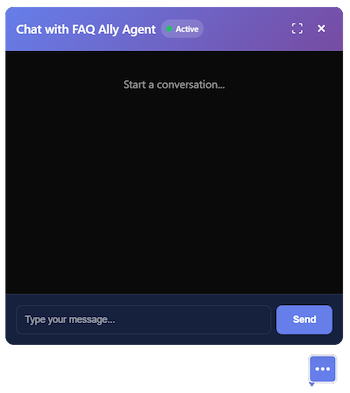
You asked: How much PTO do employees get?
Employees get 2 weeks of paid time off per year.
Confident. But wrong.

Get trusted answers from your company documents with citations you can verify.
100%Pass rate
Standard, noise, long-context, and aggregator tests
97.5%Refusal correct
Adversarial prompts (40 cases)
0.5%Hallucination rate.
Across all labeled benchmark cases
100%Groundedness
Weighted across all evaluation rows
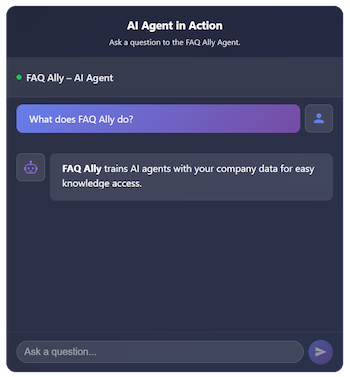
Ask a question to the FAQ Ally Agent.
Organize policies, playbooks, and customer-facing docs in one workspace, train agents on your files, and ship assistants that cite the retrieved passages they used (with document names, excerpts, and links back to your files), so teams and customers get source-backed replies, not generic guesses.

From upload to trained agent with visible sources in minutes.
Grounded responses, published benchmarks, transparent methodology
Latest published benchmark (220 labeled cases)
Curated internal evaluation set, not live user traffic. How to read these numbers
How we measure this: definitions & methodologyFAQ Ally answers from your uploaded files and surfaces where each reply came from (filenames, snippets, or page anchors), so support, HR, and revenue teams share consistent, auditable guidance. Vector search ranks the passages the model may cite; you keep control of the corpus behind every answer. Learn how AI document search helps teams stay aligned.

Supported file types for AI training:
Upload policies, SOPs, and customer-ready docs, then organize folders, tags, and metadata so the right teams maintain the canon your assistants will read from.
We chunk, embed, and index your content so retrieval favors your corpus, building assistants that answer from what you approved, not the public internet.
Ship the same agent to in-app chat, your website widget, or the REST API. Each surface can expose citations, snippets, or source metadata so every audience sees proof behind the answer.
Bring trusted information into FAQ Ally from the places your team already works. Upload existing documents, generate new files with AI, create quick snippets, or save Slack messages as draft knowledge for review.
Add policies, playbooks, PDFs, spreadsheets, and other source material directly to your workspace so your agent can train on approved knowledge.
Draft new knowledge assets with AI, then review, edit, and save them as source files your team can keep improving.
Capture short answers, procedures, and corrections as structured snippets with tags, ownership, and review status.
Capture knowledge directly from Slack, where your team already communicates, and save messages as draft snippets ready for review and training.
Every channel is built to surface answers from your indexed content: use in-app chat, drop a widget on your site, or call the REST API. Each path can expose citations or source metadata so stakeholders can verify what the model relied on.

Chat with your AI agent inside FAQ Ally. Answers draw from your uploaded knowledge; citations and source panels show filenames, snippets, or page references so reviewers can trust what they share. No setup needed, available on every plan.

Add a customizable chat widget to your website with a single line of code. Visitors get the same grounded behavior as in-app chat, with responses tied to your approved content, not the open web. Choose your theme, verify your domain, and deploy in minutes.

Build custom integrations with our REST API. Responses include structured fields you can render as footnotes, tooltips, or audit logs, so product and compliance teams keep origin alongside the text. Includes secure API keys, rate limiting, and clear documentation.
* Widget and RESTful Chat API are available on specific plans. See what each plan includes.
More capabilities when you need them: image-to-text, multimodal search, charts and tables, and advanced security controls, with the same knowledge core and deeper workflows.
Behind every answer is a multi-layered knowledge system that goes far beyond simple search. FAQ Ally continuously extracts structured data, learns which evidence paths work best, maps connections across your entire library, and gives you a live view of how it all fits together.
FAQ Ally automatically extracts structured business records from your documents during training. These BQE (Business Question Extraction) records capture key facts, figures, and relationships so your agent answers precise business questions with specific data points rather than vague summaries.
As your agent answers questions, the Active Memory Layer learns which evidence paths produce the most accurate results. Over time it prioritizes verified, high-confidence retrieval routes so repeated questions get faster, more reliable answers grounded in the strongest source material.
FAQ Ally maps connections between files, snippets, and chunks across your entire knowledge base. During retrieval, these relationship edges let the system expand its search beyond a single document, pulling in related context from other sources to build more complete, multi-source answers.
The Knowledge Map gives you a visual overview of how your uploaded knowledge, policies, and evidence connect. Explore the relationships between documents, see which topics are well-covered, and identify gaps in your knowledge base at a glance.
Any chatbot can generate text. FAQ Ally goes further: every answer is backed by traceable sources, scored for confidence, and verified against your approved knowledge before it reaches the user. The result is an AI assistant your team and customers can actually trust.
Every answer includes the document names, text excerpts, and direct links to the source files it drew from. Users see exactly which policies, playbooks, or knowledge articles backed the response, no black-box answers.
Each response carries a confidence score driven by retrieval quality, source coverage, and evidence depth. Low-confidence answers are flagged so your team always knows when to verify before sharing.
Before an answer is delivered, FAQ Ally's evidence layer checks each claim against the retrieved source material. Claims that can't be substantiated are refined or withheld, keeping hallucinations out of the final response.
Answers are generated exclusively from your uploaded documents, snippets, and approved content. FAQ Ally enforces truth ownership so the model never substitutes public-web guesses for your authoritative sources.
Drop PNG, JPG, GIF, or WebP files into the upload modal and our AI vision stack converts pixels into editable text. Every conversion runs through the same secure AI workflow you already trust: you review the transcription, edit as needed, and approve before it becomes a text file in your workspace.
Supported image types are analyzed with AI vision to extract every word, label the source, and preserve metadata without storing the raw image.
Review the transcription in-place, tweak the text, and confirm before saving.
Converted files keep the folder, tags, and descriptions you provide, update usage logs, and appear alongside your other documents instantly.

“Quarterly revenue grew 22% with the new self-service portal. Please onboard the remaining partners before end of Q4.”
FAQ Ally automatically extracts images from your PDF and Word documents during training, generates intelligent captions using AI, and links them to relevant text chunks. When users ask questions, the AI returns both text answers and relevant images, creating a rich, visual learning experience.
During training, our system automatically detects and extracts images from PDF and DOCX documents, storing them securely and generating AI-powered captions that describe the image content in context.
Images are intelligently linked to text chunks using our "Smart Image-Aware Chunking" process. You can review, edit captions, and adjust image links to ensure perfect alignment between text and visuals.
When users ask questions, the AI automatically returns relevant images alongside text answers. Images are extracted from chunks used in the response, ensuring users see visual content that matches their query.
Image support works seamlessly across all integration methods: onsite chat, widgets, and the REST API. All endpoints return image references, giving you full control over how images are displayed in your application.
When your AI agent returns comparisons, trends, or lists, ask to see them as a table or chart. FAQ Ally detects your request and renders the same data as a sortable table or as bar, line, pie, scatter, or area charts, then switch format anytime without asking again. Perfect for reports, dashboards, and data-driven answers.
Say “show as a table” or “display as a bar chart” in your question. The system parses markdown tables from the AI response and renders them interactively: sortable columns, expandable rows, and clean layout.
View the same data as table, bar, line, pie, scatter, or area chart from a single dropdown. No need to re-ask the question, ideal for sharing with stakeholders who prefer numbers vs. visuals.
For line and area charts, when the first column looks like dates (e.g. “Jan 2024”, “Q1 2024”), the x-axis automatically uses a time scale with formatted date labels so trends over time are clear at a glance.
Open any chart in full-screen for presentations or deep dives. On phones and tablets, bar charts flip to a horizontal layout and controls stay touch-friendly so data stays readable everywhere.
See the Visualizations how-to guide for step-by-step tips.
One answer. Multiple views.
When you enable Multimodal Image Embedding, FAQ Ally extracts images from your PDFs and Word documents during training and embeds them as vectors alongside text. Your AI agent can then find and return relevant images (diagrams, screenshots, charts) directly in answers, not just text chunks.
Images are automatically extracted from PDFs and DOCX files, embedded with the same vector model as your text, and stored in the same index. Queries that match an image semantically will surface it in the answer.
Ask about diagrams, flowcharts, or screenshots in plain language. The system understands image content and retrieves the most relevant visuals - no need to describe filenames or exact locations.
Multimodal Image Embedding is included in Trial, Small, Medium, Large, and Enterprise plans (Mini and Starter excluded). Enable it per agent during training with a single checkbox next to Smart Image-Aware Chunking.

We keep your documents and data protected with strong, layered security. Every file is uploaded through a secure channel and stored in encrypted storage. Your business information (profiles, company details, activity logs) lives in a protected database with strict access controls so only the right people can view or edit it.
Every important action, like updating settings or managing access, is verified and logged so you always have a clear record of who did what.
Files travel through a secure channel before landing in encrypted storage.
Company, profile, and audit data live behind strict access controls.
Changes to settings and access produce immutable logs for your team.
Want to learn more about Security?
Encryption at rest & in transit
Role-based access controls
Audit-ready activity trails
Start with a free trial, then scale the plan that matches your storage, query volume, and team size. Every tier keeps answers grounded in the documents you upload, with citations your stakeholders can inspect.
1,000 Queries
100 MB Storage
Unlimited Users
1 AI Agent
2,500 Queries
250 MB Storage
Unlimited Users
2 AI Agents
5,000 Queries
500 MB Storage
Unlimited Users
5 AI Agents
10,000 Queries
2 GB Storage
Unlimited Users
15 AI Agents
20,000 Queries
5 GB Storage
Unlimited Users
30 AI Agents
To see what's included in each plan click here.
All features included with the trial plan.
Here's what each limit means for your account:
The number of questions your AI agents can answer per month. Each interaction with your AI agent counts as one query, whether through the chat widget, API, or direct interface.
The total amount of file storage space available for your uploaded documents. This includes all files used to train your AI agents.
You can add as many team members, employees, customers, or users to your account as needed. There's no limit on the number of people who can access and use your AI agents.
The number of separate AI agents you can create and train. Each agent can be trained on different documents and serve different purposes, such as customer support, internal knowledge base, or specialized departments.
The number of images you can convert to editable text per month using our AI vision technology. Upload PNG, JPG, GIF, or WebP files to extract text content that can be used to train your AI agents.
Click on a feature to see a description:
| Feature (per month) | Mini | Starter | Small | Medium | Large |
|---|---|---|---|---|---|
| Price | $9 | $29 | $49 | $69 | $129 |
| Queries | 1,000 | 2,500 | 5,000 | 10,000 | 20,000 |
| Storage | 100 MB | 250 MB | 500 MB | 2 GB | 5 GB |
| Users | Unlimited | Unlimited | Unlimited | Unlimited | Unlimited |
| AI Agents | 1 | 2 | 5 | 15 | 30 |
| Image-to-Text Conversions | - | 50 | 150 | 500 | 1,000 |
| AI agent training from your data | |||||
| Easy knowledge access for all users | |||||
| Role-based access control | |||||
| Real-time analytics & insights | |||||
| Company branding | |||||
| Smart Image Training | |||||
| Text Document Optimizer | |||||
| Document Analyzer | |||||
| Document Creator | |||||
| Multi-Factor Authentication | |||||
| Confidence Scoring | |||||
| Data Citations | |||||
| Vector search technology | |||||
| Intelligent Caching | |||||
| Cache Warming | |||||
| Graphing Visualization | |||||
| 24/7 AI assistant availability | |||||
| Audit logs & activity tracking | |||||
| Image to Text Conversions | |||||
| AI Agent Widget | |||||
| Multimodal Image Embedding | |||||
| Chat API for integrations | |||||
| Multi-audience deployment | |||||
| Email support |
Founded in 2025, FAQ Ally was created to solve a critical problem: businesses have valuable knowledge locked away in documents, making it difficult for customers, employees, and teams to access the information they need quickly.
We've built an AI agent training platform and knowledge management system that transforms your company data into intelligent assistants. FAQ Ally helps small businesses create AI assistants from their own documents. Simply upload your files, train AI agents, and deploy them to deliver fast, accurate answers to employees and customers. Answers stay tied to cited sources and excerpted retrieval chunks, so you can review what was cited, and we publish methodology for our internal answer-quality benchmarks. See how we measure groundedness. Explore knowledge management use cases for different teams, or read our guides on FAQ software and AI for small business.
Ready to transform your company knowledge?
Let's discuss how FAQ Ally can help your business.